
Resource Groups


Last updated May 16th, 2019 | Page history | Improve this page | Report an issue
Support the team building MODX with a monthly donation.
The budget raised through OpenCollective is transparent, including payouts, and any contributor can apply to be paid for their work on MODX.
Backers
Budget
$0 per month—let's make that $500!
Learn moreWhat is a Resource Group?
A Resource Group is a collection of Resources, e.g. "Members Only" pages. When coupled with User Groups, Resource Groups are used to restrict access to pages and resources. A MODX page can belong to multiple resource groups.
Usage
You can manage the pages in a Resource Group in two different ways:
Option 1
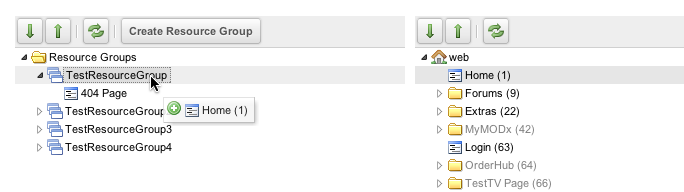
Go to Security -> Resource Groups. From there you will see a list of all defined Resource Groups and a tree of Resources.
Drag the Resources from the right tree directly into Resource Groups in the left tree:
Option 2
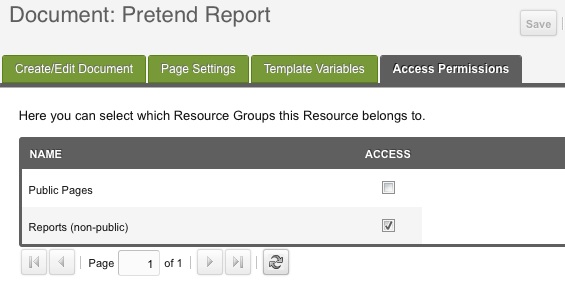
When you are editing a Resource directly, click on its "Access Permissions" tab, and check which Resource Groups it is a member of.
See Also
- Users
- User Groups
- Resource Groups
- Roles
- Policies
- Security Tutorials
- Hardening MODX Revolution
- Troubleshooting Security
Support the team building MODX with a monthly donation.
The budget raised through OpenCollective is transparent, including payouts, and any contributor can apply to be paid for their work on MODX.
Backers
Budget
$0 per month—let's make that $500!
Learn more