
modMobile


Last updated Oct 27th, 2020 | Page history | Improve this page | Report an issue
Support the team building MODX with a monthly donation.
The budget raised through OpenCollective is transparent, including payouts, and any contributor can apply to be paid for their work on MODX.
Backers
Budget
$0 per month—let's make that $500!
Learn moreWhat is modMobile?
modMobile is a plugin that changes your template when a mobile device visits your site.
History
| Version | Release date | Contributors | Remarks / highlights |
|---|---|---|---|
| 1.0 pl | Jan 5th, 2012 | Josh Gulledge | Added Snippet and refactored the code |
| 0.1.0 alpha | Mar 03, 2011 | Jeroen Kenters | Initial release. |
Requirements
- MODX Revolution
- Mobile template
Development & Bug reporting
modMobile is currently being developed on Github. That is also the place to report bugs, file feature requests and improvements.
Upgrading
You may have to set the value of the System Setting modmobile.mobile_template as this has changed form just mobile_template. If you sit have the original setting mobile_template remove it.
Installation
Install through Package Management
Troubleshooting
Since this is an early beta, a lot of things might go wrong after installing this package. Just disable the plugin if you run into any problems and you should be fine. Don't forget to report bugs on our github page!
Usage
Example1
Using one template for mobile and full site
- Go to System -> System Settings
- Set the USE Placeholder to Yes
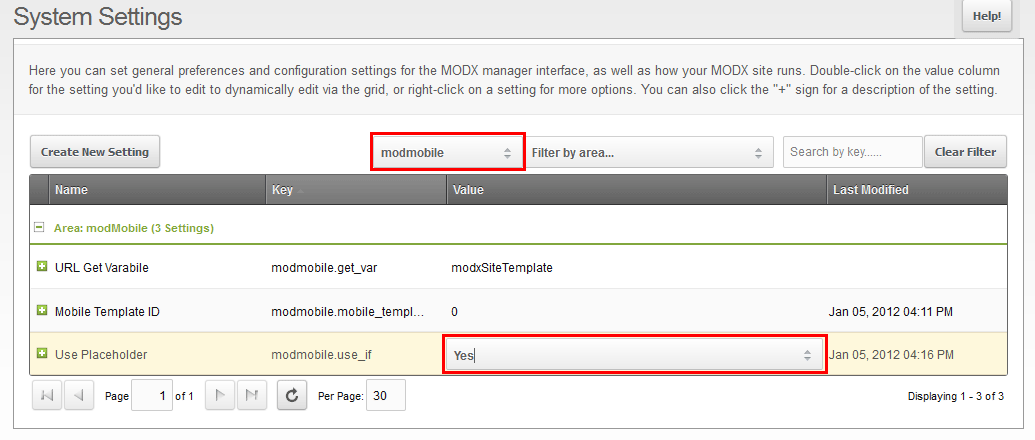 3. Lets assume that the only difference between your standard version and the mobile version is the CSS file then in your template do something like this:
[[If?
    &subject=`[[+modxSiteTemplate]]`
    &operand=`mobile`
    &then=`<link rel="stylesheet" type="text/css" media="all" href="/assets/templates/css/mobileLayout.css" />`
    &else=`<link rel="stylesheet" type="text/css" media="all" href="/assets/templates/css/commonLayout.css" />
    <!--[if IE 6]>
        <link rel="stylesheet" type="text/css" media="all" href="/assets/templates/css/ie6.css" />
    <![endif]-->`
]]
Note: modxSiteTemplate is the value of modmobile.get_var and the same that you will need to send to the url to switch templates. You must also install the If extra for this example to work!
- Now just put a link in your template to the mobile version and then to the full version:
<!-- Moblie Link -->
<a href="[[~[[*id]]]]?modxSiteTemplate=mobile">Mobile</a>
<!-- Back to Full site link -->
<a href="[[~[[*id]]]]?modxSiteTemplate=full">Full Site View</a>
Note this is optional but highly recommended.
Example2
Using a separate mobile template
- Go to System -> System Settings
1.1. Select modmobile, see image
1.2. Enter in your mobile template ID
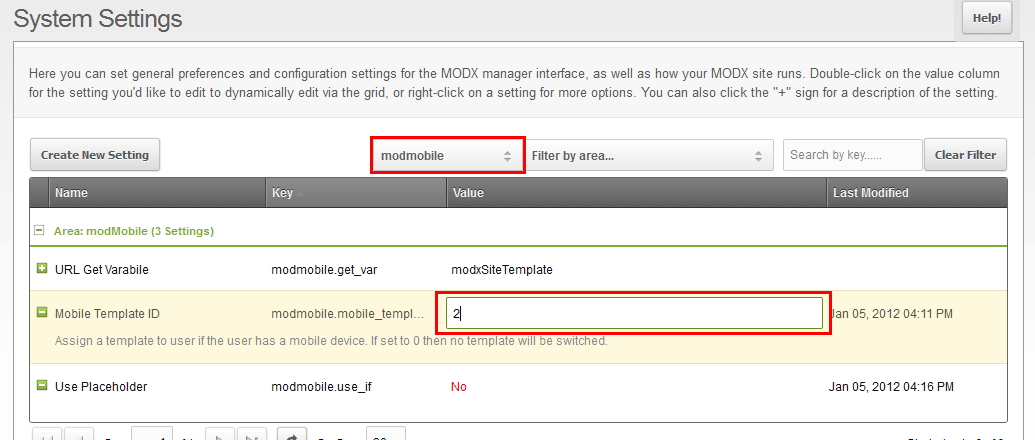
- Just visit your site on a mobile device like an iPhone or iPad. Your mobile theme should show up.
- Now just put a link in your templates a link to the mobile version and then to the full version like so: Note this is optional but highly recommended.
<!-- Moblie Link -->
<a href="[[~[[*id]]]]?modxSiteTemplate=mobile">Mobile</a>
<!-- Back to Full site link -->
<a href="[[~[[*id]]]]?modxSiteTemplate=full">Full Site View</a>
Support the team building MODX with a monthly donation.
The budget raised through OpenCollective is transparent, including payouts, and any contributor can apply to be paid for their work on MODX.
Backers
Budget
$0 per month—let's make that $500!
Learn more